You know that feeling when your to-do list keeps growing faster than you can check things off? You’re not alone. Work tasks pile up. Side projects call for attention. Personal errands multiply. Social commitments fill the calendar. Everything blends into one endless stream of things you need to do.
The modern world demands more from us every day. And we’re all trying to keep up.
When Productivity Tools Make You Less Productive
Here’s what typically happens. You feel overwhelmed. You look for solutions. You download a task manager app. Then a calendar app. Then a note-taking app. You add reminders. You try a time tracker. You read about GTD (Getting Things Done). You learn the Pomodoro Technique. Someone mentions the Eisenhower Matrix. You hear about the Bullet Journal system.
Before you know it, you have six apps and four different methods. And somehow, you’re spending more time managing your productivity system than actually being productive.
Sarah Chen, a software developer from San Francisco, knows this problem well. “I had apps for everything,” she says. “One for work tasks, one for personal stuff, one for habits, one for notes. I spent my mornings just syncing everything and deciding which app to open first.”
This is the productivity paradox. The tools designed to save time start eating it instead.
The Real Problem With Traditional Methods
Most productivity methods were born in a different era. David Allen published Getting Things Done in 2001. Smartphones didn’t exist yet. The Eisenhower Matrix came from principles developed in the 1950s. Back then, work stayed at the office. Information came through a few channels. Life moved slower.
Today’s reality looks completely different. Work follows us everywhere. Notifications never stop. Projects overlap constantly. The boundary between work and personal life has blurred. Remote work adds another layer of complexity.
Traditional systems can’t keep up. They need too much manual work. Every time something changes (and things always change), you need to update your entire system. A meeting gets rescheduled. A new urgent task appears. A deadline moves. Now you’re spending 30 minutes reorganizing your task list instead of doing actual work.
Marcus Rodriguez, a freelance designer, describes his experience: “I tried every system out there. Color coding, priority flags, time blocking. But life doesn’t follow a perfect system. Something urgent always comes up. My carefully planned day would fall apart by 10 AM.”
Modern Life Demands a New Approach
We live in an age of constant movement. People work from home, from cafes, from co-working spaces, from different cities. The traditional 9-to-5 schedule has dissolved. Information floods in from emails, messages, social media, news feeds, work chats, and personal notifications.
This creates a race against time. Everyone feels it. The pressure to do more, faster, better. But here’s the catch: trying to control everything leads to burnout, not productivity.
Recent studies show something interesting. The most productive people don’t plan every minute of their day. They don’t use the most complex systems. Instead, they find balance. They have enough structure to stay organized but enough flexibility to adapt when things change.
And things always change.
Enter Smart Task Management
A new generation of tools is emerging. These tools work differently. Instead of demanding constant attention and manual updates, they use artificial intelligence to handle the boring stuff.
The philosophy has shifted. Old tools asked: “How can we store your tasks?” New tools ask: “How can we help you actually get things done?”
Here’s what makes them different:
They understand context. The system knows what time it is. It knows how much free time you have. It sees which tasks connect to each other. It doesn’t just store a list. It adapts that list to your real situation.
They accept natural input. You don’t need to fill out forms. No fields for “title,” “deadline,” “category,” “priority.” Just capture your thought: “Need to prepare that client presentation.” Or “Call mom about birthday plans.” Or “Review the quarterly report.” The system figures out the structure.
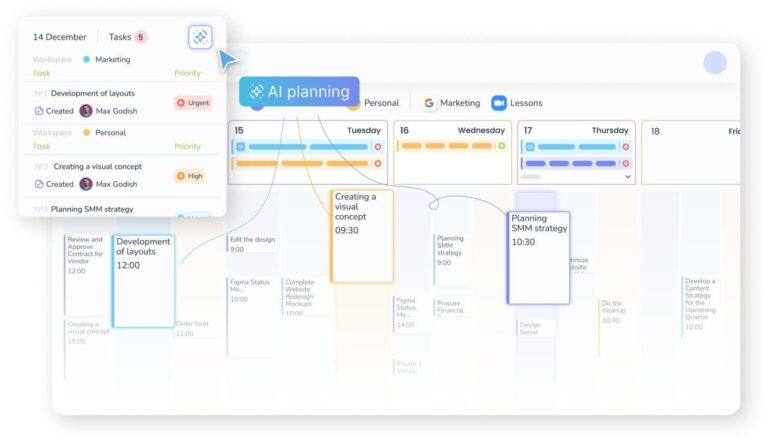
They plan automatically. Instead of manually dragging tasks around a calendar, the system suggests when to do what. It considers deadlines. It estimates how long things take. It looks at your existing commitments.
They reduce mental load. Less time deciding how to organize means more time actually doing.
Lisa Martinez, a marketing manager, switched to an AI-based system six months ago. “I just tell it what I need to do,” she explains. “Sometimes I type it. Sometimes I use voice notes. The app sorts it out. It’s like having a personal assistant who actually knows my schedule.”
One tool gaining attention is Voiset AI personal planner. It works on this exact principle. You capture tasks however feels natural (voice, text, quick notes). The AI structures everything and builds your action plan. The technology adapts to you, not the other way around.
What Actually Works: Practical Steps
No matter which tools you choose, some principles remain universal. These come from both research and real user experiences:
Capture first, organize later. When something comes to mind, write it down immediately. Don’t stop to categorize it. Don’t evaluate its importance. Don’t schedule it yet. Just get it out of your head and into a trusted system. Your brain shouldn’t be a storage device.
Batch your planning time. Instead of constantly switching between doing tasks and organizing tasks, set aside specific moments for planning. Maybe 15 minutes each morning. Look at what you captured. Decide what needs attention. Then close the planning app and focus on work.
Work with fewer active tasks. Looking at 50 uncompleted items creates anxiety, not motivation. At any moment, you should have only 3 to 5 tasks you’re actively working on. Everything else can wait in the background.
Delete without guilt. That task sitting on your list for three weeks? If you haven’t done it, maybe it’s not actually important. Regular cleanup matters. Remove what’s lost relevance. Your list should reflect current reality, not past intentions.
Automate the repetitive stuff. Recurring tasks, standard processes, routine checks. Anything that happens regularly should require minimal mental energy. Set it up once and forget about it.
Tom Jensen, a project manager handling multiple teams, puts it simply: “I stopped trying to remember everything. I stopped trying to control everything. I capture what matters and let the system handle the details. My stress dropped. My output increased.”
The Path Forward
Real productivity isn’t about doing more things. It’s about doing the right things with less stress. In a world where information and tasks grow exponentially, success doesn’t come from speed. It comes from focus.
The winners aren’t those who complete the most tasks. They’re those who complete the most important tasks while maintaining their sanity.
Modern technology is finally catching up to modern life. AI, context awareness, smart automation. These aren’t just buzzwords. They’re turning task management from a job itself into a background process. Something that happens naturally without consuming your attention.
The old way required you to serve your productivity system. The new way makes the system serve you.
Maybe it’s time to stop searching for the perfect productivity method. Maybe it’s time to stop adding more tools and more complexity. Maybe the answer is simpler: use tools that do the thinking for you, so you can focus on the work that actually matters.
After all, productivity tools should make life easier, not harder. That’s the whole point.


He is a computer engineer by day and a gamer by night. He has played many different games, like retro games like Contra, classic Mario, to AAA games. He likes to share his passion for gaming through his guides.