

The line is already live and the clip does not exist yet. On a tech desk that publishes guides, that gap is not a styling problem. It is the chance that a generated frame will show a version number, a drop rate, or a branded UI the article never proved. A text to video flow only helps here if the prompt starts from the sentence already on the page, not from a wish to look more cinematic.
The new temptation is to type two English adjectives and hope the model invents the shot. Viddo AI can turn a prompt, a scene note, or a short script into a clip with picture, motion, and music. The speed is real. The editorial cost shows up when Prompt Translate, built to move instructions into English, adds a celebration, a global launch, or a sign the writer never signed.
Copy One Closed Sentence Before Translate
Before the panel opens, copy one sentence from the published post. “The patch notes list a matchmaking change and do not name a second mode” is usable. “Make it feel like a worldwide launch trailer” is not. The second line asks for crowds, fireworks, and a ticker the desk did not check.
Readers treat motion as proof. If the article says a tool can trim a clip, and the video shows a packed stadium, the page just claimed a scale nobody measured. The approval rule is short: the file may illustrate only the action the sentence already names.
Keep Numbers Off The Generated Frame
Percentages, prices, and version strings stay in the body. The clip can carry a desk lamp, a keyboard, a hand on a trackpad. When the generator tries to write a figure on a monitor or a poster, the error risk jumps and the afternoon disappears into retakes.
A short reject list is enough: no store badges, no fake patch numbers, no “record download” on screen. If one appears, the file does not enter the queue even if the camera move feels serious. In our desk the first preview is placed next to the original paragraph before anyone talks about taste.
Compare Three Routes On The Same Line
The useful test is not which model looks more like a commercial. It is which route reduces the claim that would be most expensive to walk back. The same published sentence can go three ways. A still with a caption is honest and slow in a feed. A clip tied to the sentence can add rhythm. An open cinematic prompt usually adds false evidence.
| Route | What survives | Typical fail | Use it when |
| Still plus caption | The exact published figure | The feed feels static | The number is the proof |
| Clip from a closed line | One named action | Soft camera drift only | The desk already signed the line |
| Open cinematic prompt | Taste, not facts | New UI, logo, or figure | Never on a checked guide |
Use the table when the note opens, not after five exports. The real cost is an hour spent arguing about a sign that should never have been generated, while the original sentence was already clearer than the clip.
Discard The File If A New Figure Appears
A visible signal beats “it looks premium.” If a percentage the article does not carry shows up around the third second, drop the file. If a store logo reads clean and the source did not authorize it, drop the file. A junior editor can apply those signals without a taste debate.
In our desk the export sits next to the original paragraph and the cover crop. If the clip invented a second mode, a handshake, or a price tag, the number could not defend the live line and the review failed. That single discard saves a public correction.
Read The English Prompt Translate Returns
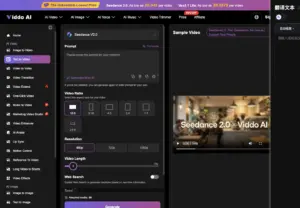
Prompt Translate exists to move the prompt into English and improve the result. On a desk that drafts in any language, a text to video run is only safe if that English is read line by line. The control is useful and risky at the same time. “A quiet desk, one person checks a changelog, no logos” can come back as “cinematic headquarters, global launch celebration.” The second text is no longer the article. It is another post.
So Translate happens after the sentence is closed, not as a way to invent the brief. If the English adds “dramatic lighting” or “record growth,” the claim changed. Delete it. Return to the short line. Only then press Generate.
Translate Only The Closed Action Line
Do not translate a mood paragraph. Translate the allowed action and the list of things that must not appear. If the English introduces a crowd, a harbor, or a named building, the clip is already arguing. On a site that publishes guides and codes, that argument reads like reporting.
Viddo AI also offers Generate With AI to expand loose words. On this desk that button waits. Expanding “new season trailer” fabricates stadiums and kits the article never showed. First the sentence. Later, if needed, a wording assist that does not add facts.
Test The Published Crop Before The Feed
An export can look fine in the wide panel and fail in the card readers actually tap. Video Ratio is not a designer preference. It is the crop the audience will treat as true. A desktop explainer usually lives in 16:9. A Stories or Reels cut asks for 9:16. The panel also lists 4:3, 3:4, 1:1, and 21:9. If the file is generated in one ratio and posted in another, a sign that “almost did not read” moves to the center.
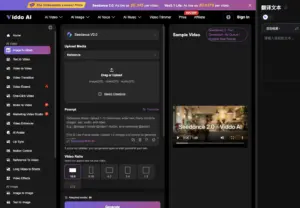
Resolution of 720p or 1080p should follow the page weight, not the highest menu item. The 480p option exists; it is not an excuse to skip the crop test. Length of 5 or 15 seconds should follow the sentence. A three-line note rarely needs a long camera move. If the idea needs more time, write another paragraph first, then decide whether a second clip is justified.
The Cover Crop Is Not The Vertical Crop
In our desk the same file in the cover module and in a vertical card moves the fail. In 16:9 a poster sat in the background. In 9:16 the poster became the subject. The first preview looked fine until the crop shoved invented text into the center. The test is not “it looks good in the generator.” It is “it looks honest in the crop that actually ships.”
If the vertical crop forces invented margin, do not generate. Stay on a still. The model will fill the edges, and those edges become the next correction. A plain hallway the article can defend beats a skyline nobody photographed.
The Written Line Still Owns The Clip
The model does not read the changelog PDF. It only sees the text pasted into the box. An empty prompt fills with a generic office, applause, and a plausible number. It also does not replace a message to the person who owns the product page when the clip implies a feature that is not live. Human judgment is the close, not the Generate button.
A tech desk can use Viddo AI to illustrate an action already written. It cannot decide whether a UI, a logo, or a ticker is true. That decision belongs to the editor who ships the post.
The practical door is small: one sentence from the live article, English from Prompt Translate that was actually read, a real crop, and a file that dies at the first new figure. Readers forgive a plain desk. They remember the clip that invented a record. If someone asks for spectacle, return to the article and ask which line it illustrates. If there is no line, there is nothing to generate.


He is a computer engineer by day and a gamer by night. He has played many different games, like retro games like Contra, classic Mario, to AAA games. He likes to share his passion for gaming through his guides.